ReciScan - Cookbook Maker
- 4.1
- Rating
- 10.00K
- Installs
- Free
- Price

 Analysis by App-foxy
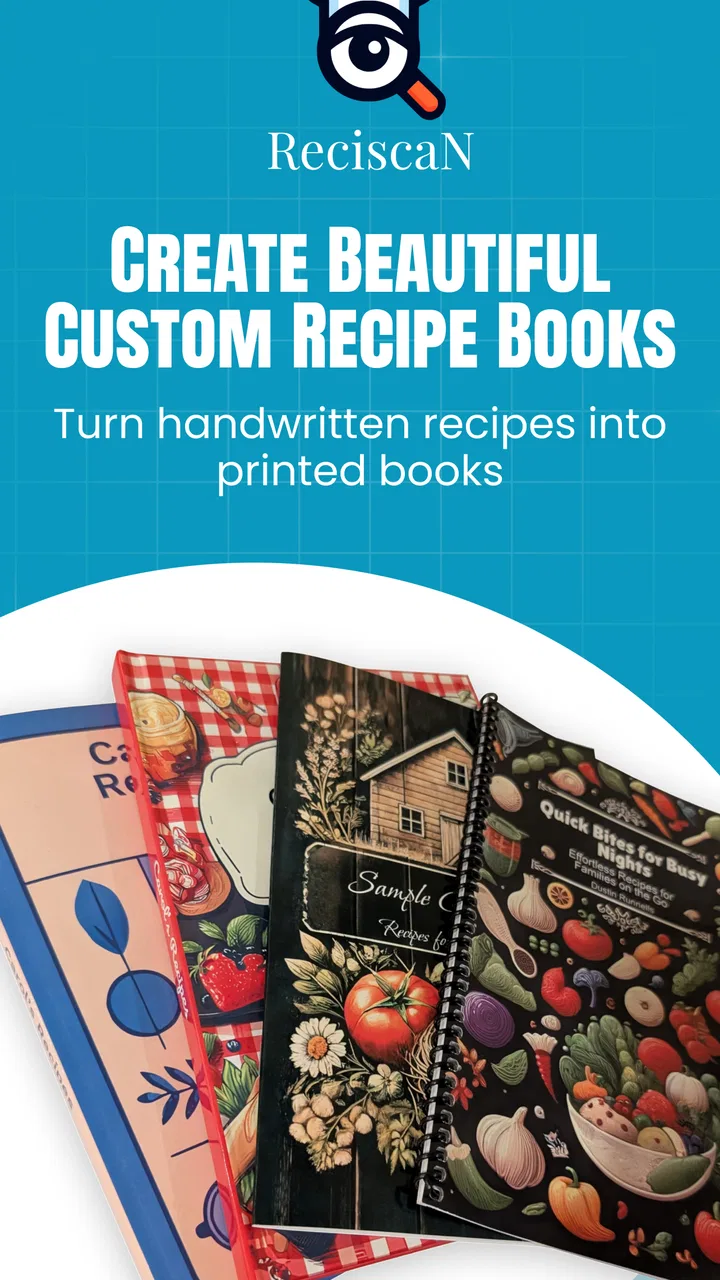
I like the idea behind ReciScan - Cookbook Maker because it treats recipes as something worth keeping, not just something to glance at on a phone and forget. In my experience, the app makes the most sense for people who have recipes scattered across handwritten cards, screenshots, websites, and social media posts, yet still want a personal cookbook they can eventually hold in their hands. It is a free food and drink app from developer Dustin Runnells, with a simple focus: scan recipes, arrange them into a custom collection, and order printed books.
That focus gives it a different personality from a typical recipe browser. I am not opening it mainly to discover an endless stream of dinner ideas. I would use it to preserve recipes I already care about and turn a messy household collection into something more deliberate. The current version is 1.0.82.0, and it runs on Android 7.0 or later. Its Everyone age classification also makes the basic concept suitable for a household device, although that should not be confused with built-in family management or separate child accounts.
How ReciScan fits into a real shared kitchen
The most convincing use case is a shared kitchen where several people contribute recipes but nobody has a reliable system for storing them. Imagine a family preparing for a holiday meal. One person has a stained recipe card from a grandparent, another has a screenshot of a pasta dish, and someone else has a favorite recipe saved in a browser. Instead of asking one person to retype everything into a document, the household can use the app as a place to gather those materials and work toward a printed cookbook.
You May Also Like

 AccuWeather: Weather Radar
AccuWeather Review: A Quick, Clear Forecast for Everyday Decisions
For everyday plans, the best forecast is the one you can understand quickly. AccuWeather makes rain timing, radar, and local conditions easy to act on, with a few trade-offs.

 Hill Climb Racing
Why Hill Climb Racing Still Turns Crashes Into One More Run
A tiny car, a bumpy hill and one more upgrade: Hill Climb Racing keeps resurfacing because its simple chaos makes every near-miss feel personal.

 AliExpress - Shopping App
AliExpress Makes Global Shopping Feel Personal, but Shoppers Bear the Risk
AliExpress turns a global marketplace into a pocket-sized discovery engine. Its reach is useful, its shopping loop compelling, and its trade-offs easy to miss.

 Lords Mobile: Kingdom Wars
Lords Mobile Is a Kingdom-Building Routine, Not a Quick Match
A case-by-case verdict on the building, battles, device demands, and social commitments that make Lords Mobile rewarding for some players and exhausting for others.

 PDF Scanner app - TapScanner
TapScanner Makes Paperwork Easier to Capture, Check, and Share
TapScanner makes scanning with a phone feel less like a rescue operation and more like a dependable step in getting work done. Its capture tools are useful, though not flawless.

 Block Blast!
 Shows How Much a Puzzle Game Can Leave Out
A quiet grid game shows why puzzle players increasingly value instant clarity, repeatable skill and low-pressure play—and where the genre still needs to catch up.
More From Our News Desk
View All News


That workflow is more personal than bookmarking recipes in a browser. A bookmark points to somebody else’s page, which may change, disappear, or become difficult to read while cooking. A printed collection can stay in the kitchen and be passed around. The important trade-off is that scanning is only the beginning. I would still check every imported recipe carefully before treating it as the final family version, especially if the original card is faded, handwritten, folded, or decorated with notes.
For a shared tablet or phone, I would establish a simple household routine before scanning anything. Decide whose collection is being built, whether contributors are adding recipes to one common book, and who has the final say on corrections. Without that agreement, a shared cookbook can become a pile of half-edited entries. The app’s value comes from organizing meaningful recipes, not from automatically solving family disagreements about ingredients, names, or serving instructions.
A useful approach is to scan in batches rather than trying to process an entire kitchen drawer at once. I would start with recipes that are already used regularly, then add sentimental or seasonal ones. This makes it easier to notice mistakes and keeps the project manageable. It also gives the household a chance to agree on categories and ordering before the collection becomes too large to review comfortably.
Scanning is convenient, but inspection still matters
The scanning concept is the app’s most practical feature, but it should be treated as assisted transcription rather than magic. A clean printed recipe is likely to be easier to work with than a card written in cramped handwriting. Ingredients can be misread, fractions can be awkward, and line breaks can make preparation steps look as though they belong to the wrong ingredient. Those are not minor details when someone is cooking from the final book.
My advice is to compare the scanned result with the original immediately, while the source is still in front of you. Pay special attention to quantities, oven temperatures, timing, abbreviations, and words such as “divided” or “optional.” If the app gives you an editable result, corrections should be made before the recipe is designed for printing. If you wait until the finished book arrives, fixing a small error becomes much more inconvenient.
There is also a household benefit to reviewing scans together. A teenager can help read a difficult card, an older relative can explain an unfamiliar shorthand, and the person who originally wrote the recipe can settle ambiguous instructions. That turns digitization into a small family archiving project rather than a purely technical task. The app provides the destination, but the household supplies the context that makes the cookbook accurate.
Designing a cookbook requires decisions, not just uploads
The design stage is where ReciScan moves beyond ordinary recipe storage. A useful printed cookbook needs an order that makes sense to the people who will use it. I would group recipes by practical occasions rather than automatically following the order in which they were scanned. For example, everyday meals, baking, celebrations, and family specialties may be more useful than a long chronological stream.
Before committing to a print order, I would read the collection as if I were standing at the counter with flour on my hands. Are similar recipes easy to find? Are long instructions separated clearly from the ingredient list? Does a recipe title make sense to someone who did not originally write it? These questions are easy to overlook when viewing entries one at a time on a screen.
One non-obvious advantage of designing a custom book is that it encourages useful editorial cleanup. A household can preserve the original wording while adding a short note about a substitution, a family nickname, or the occasion when the dish is normally served. I would avoid rewriting treasured recipes too aggressively, though. The charm of a family cookbook often comes from its voice, and excessive standardization can make every page feel anonymous.
The main limitation is that a printed cookbook is less flexible than a digital list. Online recipes can be updated, searched instantly, and opened alongside videos or comments. A book cannot respond when an ingredient changes or a technique is clarified. I see ReciScan as strongest when the goal is preservation and sharing, not when the goal is live recipe research.
Ordering changes the cost and the commitment
The app itself is free, but in-app purchases are listed at $4.99 per item. That means I would approach the printing stage with a clear plan rather than experimenting casually. The cost is easier to justify when the cookbook is a meaningful household project, but less appealing if I am only testing whether scanning a few recipes works for me.
I would prepare the collection in stages: scan, proofread, arrange, ask another household member to review it, and only then consider ordering. This sequence matters because printing turns small digital oversights into a physical result. A second reader may notice that a recipe title is unclear, a page needs a better order, or an ingredient was copied incorrectly. That extra review is especially worthwhile when several people have contributed material.
For a gift, I would also think about the recipient’s cooking habits. A compact collection of recipes they actually make may be more valuable than a large book assembled simply to include everything. Someone who prefers searching on a phone may not want a printed cookbook at all. Someone who cooks from inherited cards, however, may appreciate a durable version that can be used without opening a browser or handing a personal device around the kitchen.
Boundaries, coordination, and trust in a household
I’d make household expectations explicit before anyone starts adding recipes: agree on who can contribute, who makes final edits, and which personal recipes should stay out of a shared collection. That small conversation can prevent confusion later and help the cookbook feel genuinely collaborative. It also gives each contributor a clear way to raise a concern before the project moves toward printing.
Keep the project clear when several people use one device
ReciScan can be a good fit for shared-device use because the central activity is collaborative: collecting and shaping recipes. Still, I would not assume that a shared device automatically means shared ownership. Before using it with family members, decide whether the cookbook represents the whole household or one person’s private collection. That boundary affects which recipes are scanned, who can edit them, and who should approve a final design.
If several people are working on one device, a simple naming convention can prevent confusion. Recipe titles can include a contributor’s name or a familiar family label, especially when two people have different versions of the same dish. I would also keep a separate note of recipes that still need checking. That is more reliable than trusting memory after a long scanning session, particularly when the household is adding material over several days.
There is a subtle issue with personal recipes and shared access. A household member may be comfortable sharing a recipe with relatives but not with everyone who happens to use the device. I would ask permission before scanning someone else’s handwritten material, especially if the recipe came from a friend or a private family exchange. The app is a cookbook-making tool, not a reason to ignore the ownership or wishes of the person who created the recipe.
Coordination is where the app either succeeds or becomes cluttered
The app can support a coordinated cookbook project, but coordination still needs a human process. I would choose one editor for the final pass, even if everyone is invited to contribute. That person does not need to rewrite the recipes; their job is simply to check titles, remove accidental duplicates, confirm corrections, and make sure the book has a consistent structure.
A particularly useful workflow is to separate “ready” recipes from “needs discussion” recipes in your household notes or planning process. A recipe with an unclear measurement should not be treated the same way as a clean, verified entry. This distinction prevents a rushed contributor from assuming that every scanned page is ready for printing. It also gives older children a safe way to participate: they can help with titles, sorting, and visual review without being responsible for deciding whether a cooking instruction is correct.
Another practical trade-off is consistency versus authenticity. If every contributor uses different measurements, naming styles, and levels of detail, the book may feel uneven. On the other hand, changing every recipe into one formal style can erase the personality that made the collection worth preserving. I would standardize only what improves usability, such as obvious title formatting or repeated section labels, and leave family stories and distinctive wording intact.
Age suitability does not replace adult judgment
The Everyone age rating fits the app’s general purpose. A child can reasonably take part in scanning or arranging recipes with an adult nearby, and the activity can become a constructive way to learn organization, reading, and kitchen vocabulary. I would be comfortable presenting it as a family project, not as a cooking authority that children should follow without supervision.
That distinction matters because a cookbook may contain instructions involving heat, sharp tools, allergens, or food-safety decisions. The app preserves and presents recipes; it does not make those activities safe by itself. An adult should check the content and decide which recipes are appropriate for a child to prepare. I would also explain that a recipe copied from an old card may need modern judgment about storage, cooking temperature, or ingredient substitutions.
Trust is equally important for adults sharing a device. The app is a good place for a common cookbook, but I would avoid treating it as a private diary unless the household has agreed on who can view and edit the collection. If personal recipes, notes, or family stories are mixed together, everyone should understand that the project is collaborative. Clear expectations are more useful than assuming the app will create account boundaries or permissions on the family’s behalf.
Who should choose it, and who should look elsewhere?
I would recommend ReciScan to someone who wants to turn existing recipes into a custom printed collection, especially when those recipes come from several physical and digital sources. It is also appealing for a family gift, a shared kitchen archive, or a household that is tired of searching through screenshots. The app’s small but established footprint—over ten thousand installs, with a 4.1 average from twenty-three ratings—suggests that it has found an audience, although I would still judge it by whether its scanning and design workflow match my own needs.
I would skip it if my main goal were discovering new recipes every evening, tracking nutrition, generating shopping lists, or following interactive cooking guidance. A conventional recipe platform is usually better for search, filtering, substitutions, and constantly refreshed content. I would also hesitate if I wanted a highly automated archive with no proofreading. The custom-book idea is attractive precisely because it produces something personal, but that personalization requires time and attention.
For someone using an older Android phone or tablet, the minimum operating-system requirement of Android 7.0 or later is worth checking before starting a project. The app is free to install, but the listed purchase price means the complete print-oriented experience should be considered a paid project rather than an entirely cost-free experiment. I would first test the workflow with a few representative recipes: one clean printed page, one handwritten card, and one recipe with several steps. That small trial reveals more than scanning only the easiest material.
My household verdict
After looking at the app as a practical cookbook tool rather than a general recipe service, I see a clear strength: it gives scattered, personal recipes a path toward becoming a shared physical keepsake. The best results will come from households that are willing to proofread scans, agree on ownership, and make thoughtful design choices. Its usefulness is less about how many recipes it can collect and more about whether the final book reflects the people who will actually cook from it.
I especially like the possibility of using it to preserve family knowledge without forcing every contributor to become a technical editor. Someone can bring an old card, another person can help scan it, and a third can review the wording before the collection is printed. That division of work makes the project approachable. It also exposes the app’s central limitation: the human review process is not optional if accuracy and family trust matter.
My recommendation is therefore fairly specific. Choose ReciScan if you want to curate recipes you already own and are prepared to invest time in checking and arranging them. Treat the free installation as a way to explore the workflow, not as proof that a finished cookbook will require no further commitment. For a household that values inherited recipes, shared cooking, and a tangible result, the app is a thoughtful bridge between a messy recipe drawer and a personal cookbook. For fast discovery, automated meal planning, or private multi-user organization, a different kind of food app will likely serve you better.
In the end, I would use ReciScan - Cookbook Maker with a small, well-chosen collection first. I would let the person who knows the recipes best approve the wording, involve younger household members in safe organizational tasks, and review the complete design before ordering anything. Used that way, it feels less like another place to store recipes and more like a guided project for deciding which recipes deserve to stay in the family.
FAQs for ReciScan - Cookbook Maker
01What is ReciScan - Cookbook Maker and what can I use it for?
ReciScan - Cookbook Maker is designed to help you turn recipes from printed pages, screenshots, photos, or other sources into an organized digital cookbook. After scanning or importing a recipe, you can usually review the recognized text, edit details, and keep your collection available in one place. It is useful for preserving family recipes, organizing cooking ideas, and reducing the need to search through loose notes or paper books.
02How accurately does ReciScan recognize recipes from photos or scanned pages?
Recognition quality depends on the image, lighting, font, page layout, and the condition of the original recipe. Clear, well-lit photos with the entire text visible generally produce better results than blurry, angled, or handwritten pages. You should always check the imported ingredients, quantities, cooking times, and instructions before using a recipe, because optical text recognition can occasionally misread symbols, fractions, or unusual formatting.
03Can I edit and customize recipes after importing them?
Yes, editing is an important part of using a recipe-scanning app. Once a recipe has been imported, you should review and correct the title, ingredients, measurements, preparation steps, serving information, and cooking time. Depending on the version and platform, you may also be able to add notes, categories, photos, or other personal details, making the cookbook more useful for your own cooking habits.
04Does ReciScan - Cookbook Maker work without an internet connection?
Some functions may work offline, such as viewing recipes that have already been saved on your device, but scanning, text recognition, synchronization, account features, or cloud-based tools may require an internet connection. Availability can also vary between Android and iOS versions. Before relying on the app while traveling or cooking without Wi-Fi, open a few saved recipes and confirm that the features you need remain accessible offline.
05Is ReciScan - Cookbook Maker free to download, and are there in-app purchases?
The app may be available as a free download, but certain features can be limited by subscriptions, premium plans, advertisements, or in-app purchases. Restrictions may apply to the number of scans, cookbook storage, exporting, synchronization, or advanced organization tools. Check the current Google Play Store or Apple App Store listing before downloading, since pricing, trial periods, and included features can change over time.
Pros
- Turns scanned recipes into an organized digital cookbook.
- Helps reduce paper clutter and keeps recipes accessible on the go.
- Useful for preserving handwritten family recipes.
- Makes it easier to browse a personal collection in one place.
- Can save time when rebuilding recipes from printed cards.
Cons
- Scan quality may depend on lighting
- handwriting
- and image clarity.
- Older or unusual recipes may require manual text corrections.
- Large cookbook collections can require considerable organization time.
- Some features may be limited behind in-app purchases or subscriptions.
- Users may need backups to avoid losing recipes after changing devices.

ReciScan - Cookbook Maker
Gallery